


Transform Your Workforce with AI + Microsoft Copilot
Copilot-ready teams start here. As artificial intelligence continues to reshape the modern workplace, integrating these powerful tools is no longer an option. It is a strategic necessity. The Copilot AI Productivity Pathway offers a comprehensive, purchasable solution designed to integrate powerful AI tools directly into your organization's daily operations.
This program is more than just training; it is a structured pathway to building a more productive, efficient, and innovative team. With hands-on labs, expert instruction, and practical tools, your teams will gain the confidence to apply these technologies immediately, driving real and measurable transformation.
Who the Copilot AI Productivity Pathway Is For
This program is designed to deliver value across your entire organization. It is a perfect fit for a diverse range of professionals who are ready to embrace the future of work with Microsoft's AI and cloud technologies. Our tailored curriculum provides targeted learning paths for:
- Microsoft 365 End-Users: Individuals across all departments looking to boost personal productivity, streamline daily tasks, and enhance collaboration using AI features within Word, Excel, PowerPoint, Outlook, and Teams.
- System Administrators & IT Professionals: The technical experts responsible for deploying, managing, and securing Copilot and other Microsoft cloud platforms, ensuring a stable and secure environment for AI adoption.
- Project Managers (PMs): Leaders seeking to automate workflows, improve team communication, and leverage AI for smarter reporting and project execution.
- Security & Compliance Officers: Professionals focused on the ethical and secure adoption of AI. This track provides the knowledge needed to establish robust governance and mitigate risks.
- Federal Government and Public Sector Teams: Agencies with unique procurement, security, and compliance requirements who need a trusted, GSA-approved partner for AI enablement.
A Curriculum Built for Your Needs
We recognize that every organization's journey with AI is unique. That is why our program is built around a core principle of customization. It is not a one-size-fits-all solution but a flexible framework designed to meet your specific goals, timelines, and operational needs.
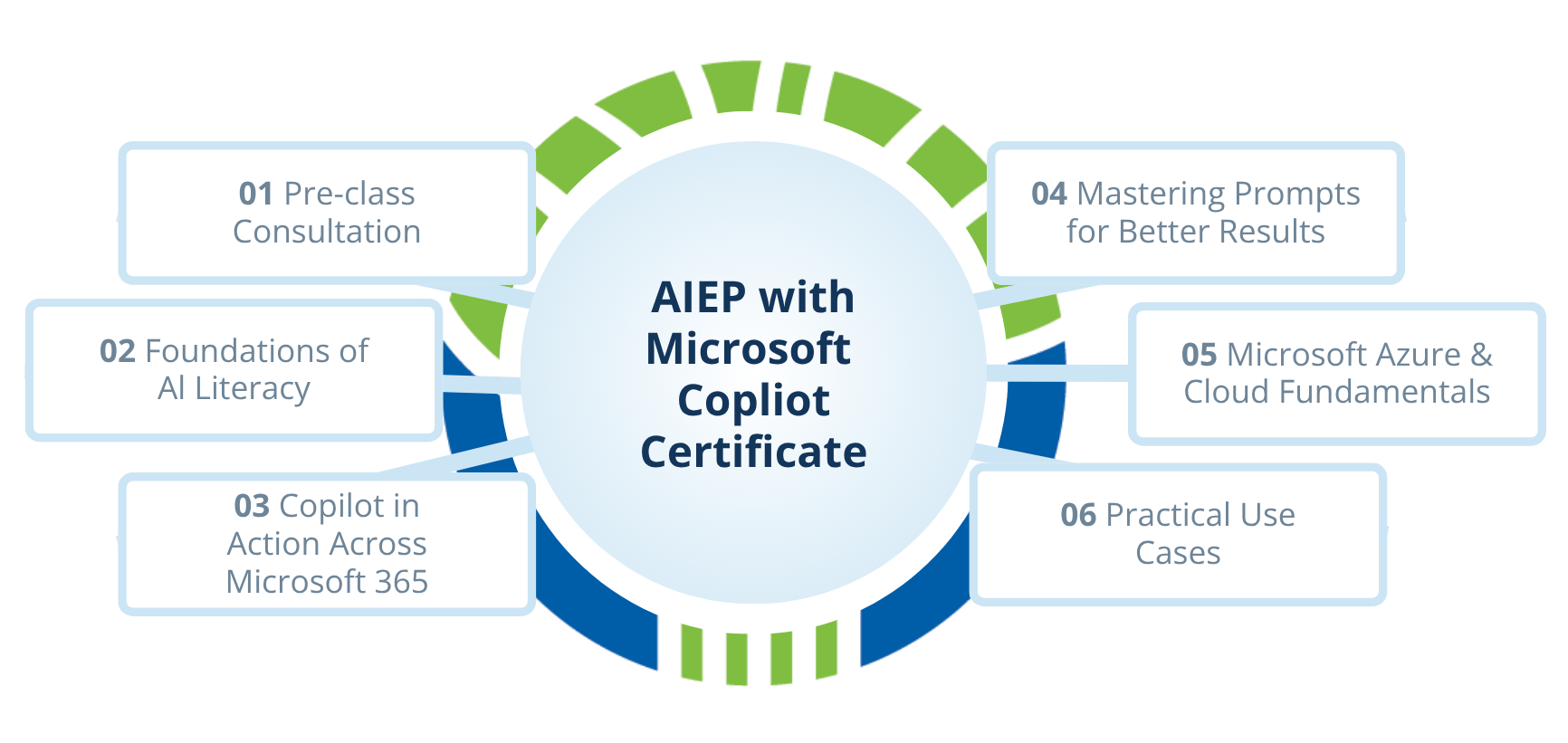
Our process begins with a pre-class consultation where our experts partner with you to understand your objectives. From there, we build a tailored learning path.
Personalized Copilot Strategy

Deepen understanding of AI, machine learning, and Microsoft’s AI ecosystem. Explore real-world examples from varying sectors—how healthcare streamlines documentation with Copilot, how finance teams automate reporting, or how manufacturers optimize process efficiency.
Copilot and Microsoft 365 Integration

Experience hands-on Copilot labs within Word, Excel, PowerPoint, Outlook, and Teams. Participants apply new features to realistic, role-based scenarios, driving meaningful performance improvements from day one.
AI & Generative Technologies Fundamentals

Dig into prompt engineering best practices. Workshops use practical business scenarios so users learn to craft and refine prompts for specific departmental needs.
Secure Deployment and Management

For IT and sysadmin teams, this module covers secure deployment and management of Copilot and related AI services in the Microsoft Cloud, focusing on compliance and ongoing improvement.
Hands-On Practice with Real Use Cases

To support ongoing adoption after the program, participants will receive:
- A Prompt Writing Cheat sheet for quick reference.
- A Copilot Quick Start Guide covering key workflows in Word, Outlook, Teams, and more.
- A curated Microsoft Learning Library, including the "Start Your Copilot and Agent Learning Journey" guide and other official Microsoft resources.
Key Outcomes
Purchasing this program is an investment in your organization's future success. Upon completion, your workforce will be equipped with the skills and strategic insights needed to excel. The key outcomes include:
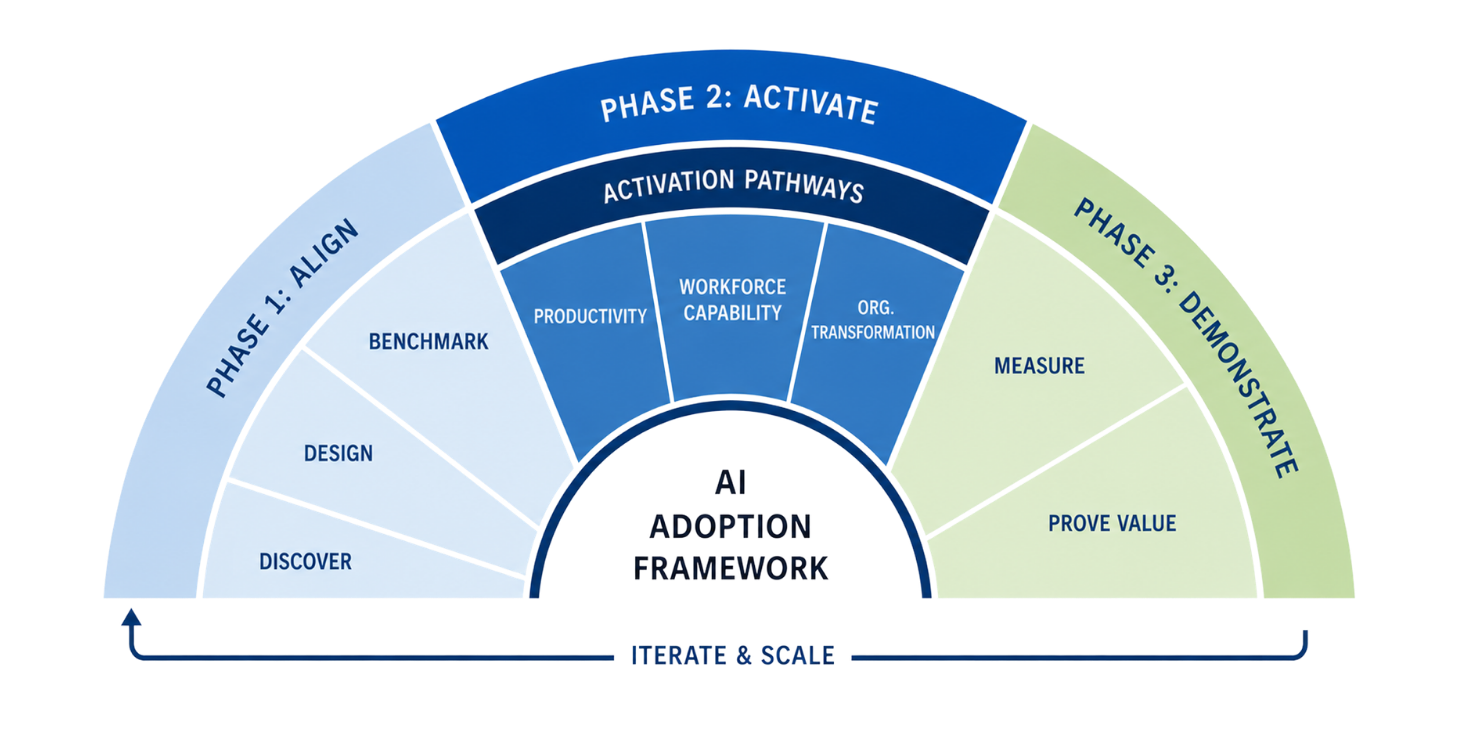
The Learning Tree AI Adoption Framework Turns Investment into Impact
Click to explore the parts of the AI Adoption Framework to see how our program supports your AI journey.
Identify the need and build the right plan.
Guiding Question: Are we ready?
Before investing in AI enablement, organizations need a clear understanding of where AI can create value, what skills are needed, and how adoption should be measured. In the Align phase, Learning Tree works with your stakeholders to clarify goals, prioritize use cases, design the right enablement plan, and establish a measurable starting point.
Key Activities
Discover: Clarify business goals, priorities, audiences, and high-value AI opportunities.
Design: Co-design an AI Adoption Program aligned to your roles, workflows, and business outcomes.
Benchmark: Establish a baseline for current AI knowledge, confidence, readiness, and expected impact.
Upskill and drive adoption.
Guiding Question: Are we capable?
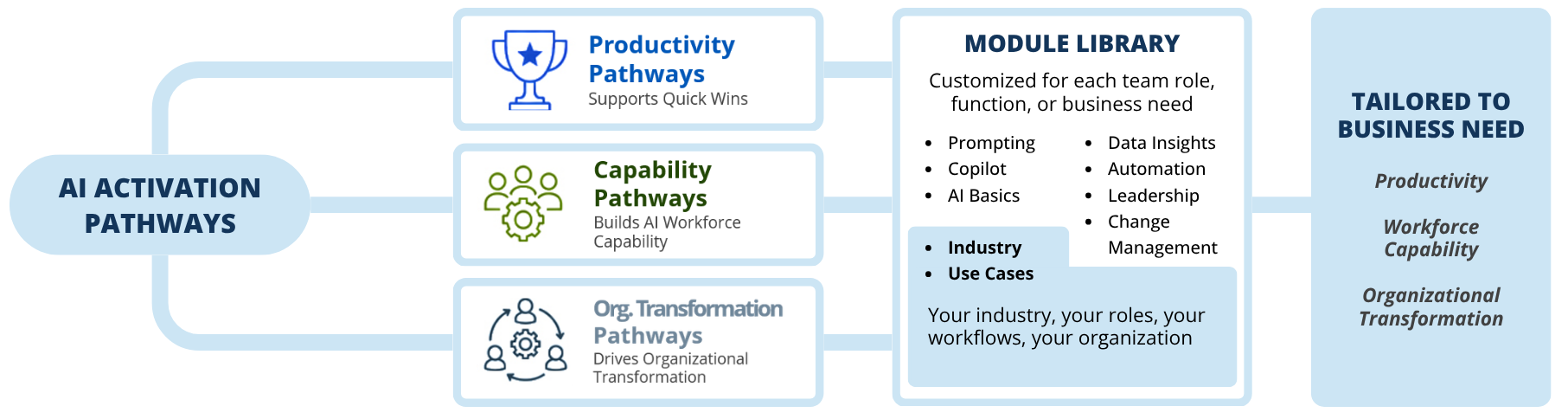
AI adoption depends on more than access to tools or one-time training. Teams need practical skill-building, real-world application, and ongoing reinforcement that helps new behaviors stick. Learning Tree’s AI Activation Pathways help organizations build AI capability in the flow of work by aligning learning to the outcomes they want to achieve quick productivity gains, stronger workforce capability, or broader organizational transformation.
Key Activities
AI Activation Pathways
Productivity Pathways: Fueling Quick Wins that Turn AI Investment into Productivity Gains
Workforce Capability Pathways: Deeper AI role-based skills for the broader workforce
Organizational Transformation Pathways: Lead AI transformation and build a resilient, AI-native organization
Validate AI impact.
Guiding Question: Is AI delivering value?
To sustain AI adoption, organizations need to show what changed and where value was created. In the Demonstrate Value phase, Learning Tree helps measure progress against the original baseline and translate adoption results into clear, executive-ready evidence of business impact.
Key Activities
Measure: Assess post-program AI knowledge, confidence, usage, behavior change, and perceived impact.
Prove Value: Translate results into a Learning Tree Impact Report that shows adoption progress, skill growth, and measurable AI value.
Have questions or need tailored guidance? Reach out to our team of specialists for expert advice and resources to help you succeed.
Frequently Asked Questions (FAQs)
Yes! While the core of this program is designed around Microsoft Copilot and cloud technologies, we offer full customization to align with other leading platforms, including Google Gemini and ChatGPT, based on your organization’s technology ecosystem and strategic goals.
This program is recommended for business end-users, project managers, IT professionals, security/compliance officers, and federal teams—anyone looking to adopt Microsoft Copilot and cloud technologies securely and productively.
No technical background is needed. The curriculum is designed for all skill levels, offering clear, structured instruction for business users and more advanced content for IT and technical teams.
We offer flexible Instructor-Led Training (ILT)—both in-person and remote—as well as OnDemand, self-paced modules. The program can also be delivered as a blended solution that combines live facilitation with curated online resources for maximum engagement and flexibility.
Absolutely. We specialize in large-group enablement and can fully support enterprise rollouts, including custom scheduling, enrollment coordination, and multi-site delivery to accommodate organizations of all sizes.
Yes, our program leverages Microsoft Official Content (MOC) and Microsoft Learn resources, which are then curated and enhanced by Learning Tree subject matter experts for an enriched learning experience tailored to your unique needs.
Participants engage in guided, interactive Copilot labs and live, role-based scenarios tailored to their job functions. Instructor-Led sessions feature hands-on activities, while OnDemand offerings provide demonstration-focused learning. A pre-class consultation ensures labs and exercises are relevant to your team’s objectives and technology environment.
Yes! As part of our customization process, we work with you to incorporate industry-relevant use cases, practical scenarios, and examples that address your organization’s direct needs—whether in finance, healthcare, legal, manufacturing, government, or another sector.
Hands-on labs focus on the core suite of Microsoft 365 applications, including Teams, Outlook, Word, Excel, PowerPoint, and OneDrive. We ensure the modules align with the workflows and productivity tools your teams use every day.
Yes. Our public sector clients benefit from enhanced security and compliance modules, GSA pricing, and assurance that our content meets government procurement and regulatory requirements.
Participants receive prompt-writing cheat sheets, Copilot Quick Start Guides, access to follow-up Q&A sessions, and a curated collection of Microsoft learning resources to support ongoing adoption and success.